
If you’ve ever wondered how much traffic your website is getting from ChatGPT, Gemini, Claude, or Perplexity—you can now track it. AI tools are increasingly sending visitors to websites by linking or citing content in their answers. Until now, it’s been hard to see that traffic inside Google Analytics.
This free Looker Studio dashboard solves the problem. It puts all of your LLM traffic (large language model referrals) in one place. You’ll instantly see ChatGPT traffic, AI traffic, and LLM referral traffic broken down by tool, landing page, and audience. And setup is ridiculously simple—just two clicks to connect it to your Google Analytics data.
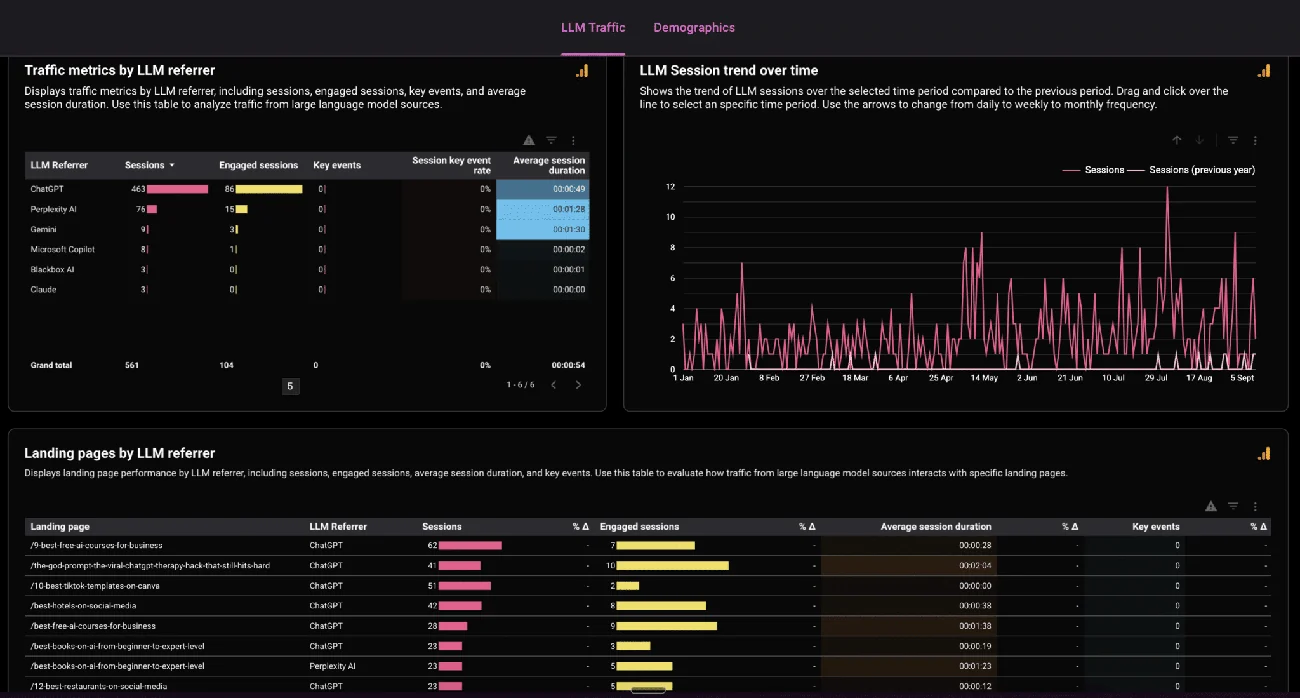
What the Dashboard Shows
LLM Traffic Overview
The top section gives you a snapshot of how much traffic you’re getting from AI. It automatically splits sessions by referrer—ChatGPT, Gemini, Claude, Perplexity, Microsoft Copilot, Blackbox AI, and more.
You’ll also see:
- Engaged sessions – how many visitors stuck around and actually read your content.
- Average session duration – how long they spent on your site.
- Key events – the interactions they triggered, like button clicks or downloads.
This way, you can measure not only how much LLM traffic you’re getting, but how valuable it is.
Landing Pages by AI Referral
Scroll down and you’ll see which of your pages are being linked to or cited by AI tools.
For example, the dashboard might show that ChatGPT sent readers to your “Best Free AI Courses” article, while Perplexity AI linked to your guide on TikTok templates. For each page, you’ll see the number of sessions, engagement levels, and time on page.
This is the closest you’ll get to seeing which queries people asked ChatGPT or Gemini that led to your site appearing. If you see certain pages being cited, run similar questions in ChatGPT yourself. That shows you how your content is surfacing—and where you might improve it to get cited more often.
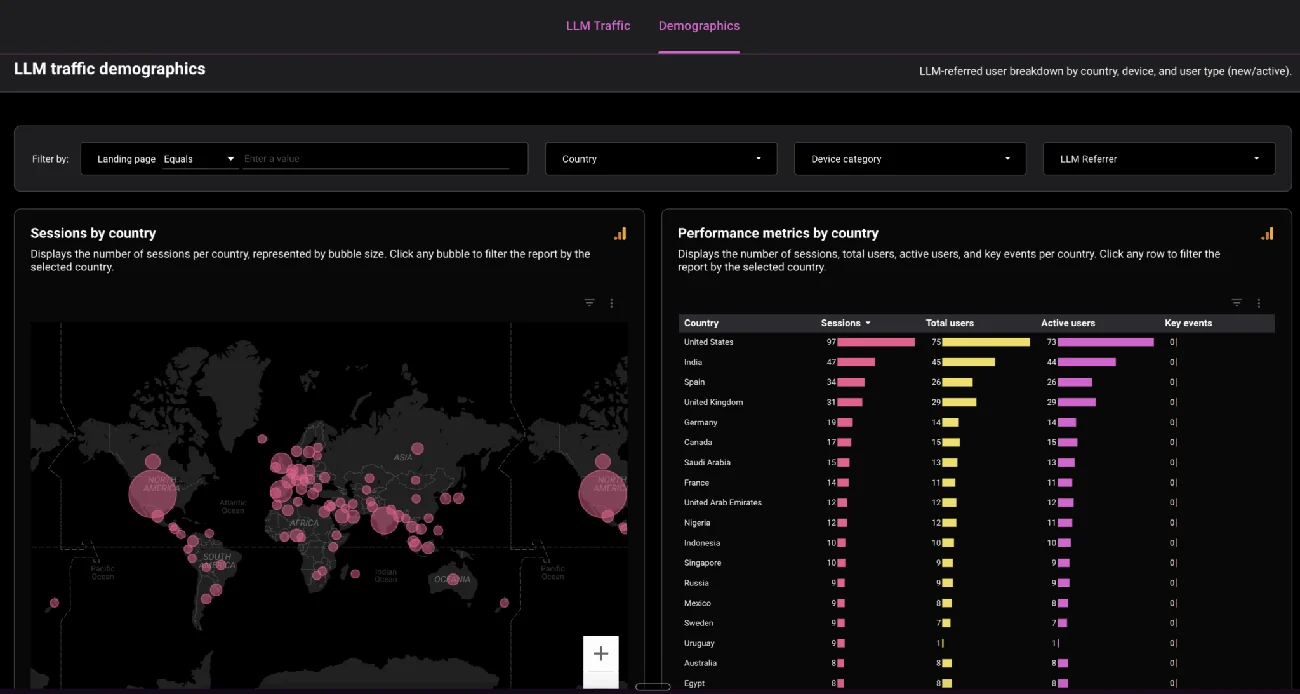
Demographics and Devices
The Demographics tab shows you:
- Which countries your LLM traffic is coming from.
- Whether visitors are on desktop, mobile, or tablet.
- Trends in active users over time.
It’s a global snapshot of your AI-driven audience.
Why Tracking AI Traffic Matters
Just like we track SEO traffic from Google, it’s now time to track traffic from AI tools. These referrals are becoming a real channel, and if your content is strong enough to get cited, you’ll see a stream of new users arriving.
With this dashboard, you can:
- Track LLM traffic sources like ChatGPT, Gemini, Claude, and Perplexity.
- Compare the quality of AI traffic vs. SEO traffic.
- Spot the pages that AI tools are already recommending.
- Find opportunities to strengthen your content so it ranks in AI answers more often.
How to Access the Dashboard
You don’t need to know how to use Looker Studio. Just follow these steps:
- Open the dashboard link.
- Select your Google Analytics property (assuming you’re already logged into Google in your browser).
- That’s it – you’ll instantly see your AI traffic data.
No custom tagging, no coding – just plug in and start tracking.
Final Thoughts
AI referrals are the new frontier of web traffic. With this Looker Studio dashboard, you can finally see how much ChatGPT traffic and AI traffic your site is getting, which pages are being cited, and how those users behave once they land.