A customer asks ChatGPT, “Where in Leeds can I get a folding bike serviced before Saturday?” Your shop has a mechanic, a workshop and a Friday appointment. Can a stranger find those three facts online? If all your homepage says is “passionate about cycling”, even a very thorough search will struggle.
To get your business found in ChatGPT, Claude, Gemini and other AI search tools, start with one question customers actually ask. See which businesses the assistant recommends and open the pages it cites. Then make sure your own pages are accessible, give a specific answer and agree with the places customers look you up. Here’s how to do that, and how to tell whether it’s helping.

Your first 30 minutes
- Try a buyer’s question before you mention your name. Use a fresh chat with web search and give the location or budget a customer would give. Save the answer and its sources. In a second chat, ask about your business by name. These two searches often reveal quite different problems.
- Check the page that should have answered. Open it on your phone. Can you see the service, location, price or booking condition the buyer asked about? Paste the URL into Google Search Console’s URL Inspection tool to see whether Google has indexed it.
- Write down a starting number. In Google Analytics, record the last 28 days of sessions from AI assistants and any enquiries or sales from those sessions. Pick one fact or page to fix first.
If you came here from my video about the ChatGPT business profile, you can jump to what’s known about claiming a business. You can do the whole checklist today.
Find out when AI recommends your business
Start with the words in your enquiries, reviews and sales calls. “Bike repairs Leeds” is a search term. “Who can service a folding bike in Leeds before Saturday?” tells you what would actually win the booking. For a national or online business, the deciding detail might be a software integration, a delivery deadline or a minimum order.
Use this prompt to turn what you know about your buyers into six questions you can test. It works in any of the assistants covered here. Download the prompt and audit worksheet.
Help me find out whether AI assistants recommend my business to the right customers. Use any relevant details I’ve already supplied. Ask one question at a time and wait for my answer. Skip anything you already know. Find out which business I mean, what I sell, who buys it, where I serve them and which questions or constraints come up in real enquiries.

Once you have enough, write six standalone questions I can paste as written into fresh chats. One should name my business and ask about its offer, location or service area, and how to buy. The other five should sound like buyers at different stages of choosing. Leave my business name, URL and any clues that point only to me out of those five. Use the language and constraints I’ve given you. Ask for current web sources in each question.

Give me a blank results table with columns for date, assistant, question, business mentioned, recommended for the job, link to my website, other sources, and factual errors. Leave results empty until I supply actual answers. When I bring them back, help me find the first page or listing worth fixing and explain which answer led you there.
Run the tests in new chats. The chat that wrote your questions already knows which business you want it to find. Use a temporary chat or turn off personalisation where available. Keep the wording, location and search setting the same across runs. Start with the assistant your customers use most, then try the same two questions in a second one. Repeat important questions three times and record each result.
Read the answer as a buyer. A mention means your name appears. A recommendation means the assistant suggests you for the job. A citation is a linked source supporting the answer. A local newspaper can get the citation while your shop gets the recommendation. Your repair guide can also earn a citation while somebody else gets the booking.
Open each cited page and find the sentence that supports the answer. If a directory lists your old address, you’ve found something to correct. If none of the links supports the claim, mark it “unverified”. In Gemini, a link found by the double-check feature can corroborate a statement even when it wasn’t a source for the original response. Record it separately. Google’s guide to sources in Gemini.
How ChatGPT, Claude, Gemini and other assistants find you
An AI assistant can answer from what its model learned during training, or it can look up current information on the web. For a business owner, the second route is the one you can act on today. A page can be available for search even if you’ve chosen to exclude it from some types of model training. The controls vary by provider.
- ChatGPT Search. Allow
OAI-SearchBotto fetch pages you want included in search answers.GPTBotis the separate training crawler. Blocking the search bot can still leave a navigational link to your site, so asking ChatGPT for your URL is a poor visibility test. OpenAI’s crawler guide. - Claude.
Claude-SearchBothelps Anthropic find and index content for search.Claude-Userhandles visits someone requests in a conversation. Check both if Claude struggles to find a page or to read a URL you give it.ClaudeBotis the training crawler. Anthropic’s guide to its three bots. - Gemini. Google can bring information from its Search index into a Gemini Apps answer at the time someone asks. The
Google-Extendedsetting covers this use as well as future Gemini model training. Check both implications before changing it. Ordinary Google Search inclusion and ranking are independent of this setting. Google’s explanation of Google-Extended. - Google AI Overviews and AI Mode. These are features within Google Search. For your page to appear as a supporting link, Google must index it and be able to show a snippet. Also check the Search generative AI control in Search Console if someone on your team has changed the site’s preferences. Google Search eligibility · Search Console’s inclusion control.
- Microsoft Copilot. Inspect your key URLs in Bing Webmaster Tools. You can import a verified Google Search Console site, submit your sitemap and check Bing’s indexing status. Then look at the AI Performance report to see which pages earn citations in Copilot, Bing and participating services. Bing’s setup guide.
- Perplexity. Allow
PerplexityBoton the pages you want surfaced in search.Perplexity-Userfetches pages in response to user requests. If your hosting provider filters bots, Perplexity publishes the addresses it uses so the provider can verify the requests. Perplexity’s crawler documentation.
How to check whether a crawler can read your site
Open /robots.txt at the root of your website. Find the group for the crawler you’re checking, or the User-agent: * group if there’s no specific match. A Disallow: / applying to that bot blocks the whole site. A rule for /checkout/ only covers that path. For a real example, open willfrancis.com/robots.txt. My file disallows /api/ and /recipes/ for all crawlers. That leaves this article open to search crawlers without a separate rule for each one.
Ask whoever manages your site to check one real service or product URL. Does it return 200 OK and the actual page content to the verified search crawler? A firewall can serve a challenge screen even when robots.txt allows access. Check the server or CDN logs for denials such as 403 or repeated 429 responses. Have them adjust the rule for the intended public pages and keep existing restrictions on private areas. OpenAI publishes its search crawler IP ranges in the guide above.
Next, inspect that same URL in Google Search Console and Bing Webmaster Tools. Look for an accidental noindex, a redirect to the homepage, or a canonical tag pointing to a different page. Check the rendered text for the fact customers need. If the booking price only appears after somebody enters a postcode, put your starting price and service area on the public page too. How to use Google’s URL Inspection tool.
How to get ChatGPT to recommend your business
Choose the customer question you most want to win. Look at the pages cited for the businesses that already make the shortlist. What can a buyer establish about them that they can’t establish about you?
- The assistant can’t find you by name. Start with crawler access and indexing, then check whether another business shares your name.
- It knows you, but recommends someone else. Look for a deciding detail in the question, such as a deadline or compatibility requirement. Check whether you meet it and whether a buyer can verify that.
- It recommends you with the wrong price, address or opening hours. Follow the citation to the error and correct that source first. A new blog post won’t fix an old directory entry.
Give buyers enough detail to choose you
Take the Leeds bike shop. Imagine its service page opens with “Expert repairs for every rider”. Suppose these are its actual terms. Its opening paragraph could read like this.
We service folding bikes at our Leeds city-centre workshop. A standard service costs £65 plus parts and usually takes two working days. We work on Brompton and Tern mechanical drivetrains. For an electric motor fault, contact the manufacturer’s service centre. Check the booking calendar for the next free appointment.
That paragraph gives a buyer a price, a location, a turnaround time and a reason to rule the shop in or out. Link straight to the booking calendar. Include opening hours and a way to confirm a deadline. An assistant could now find evidence for “services folding bikes in Leeds”. Only live availability or confirmation from the shop would justify promising Friday.
Use the same test for a service business. A bookkeeper can say which businesses it serves, which software it supports, what the monthly fee includes and what happens at year end. A B2B supplier can publish minimum order sizes, lead times and a short case study explaining a real delivery. Choose details you can prove and put them on the relevant page as ordinary, readable text. A photo of a spec sheet is a poor place to leave the only copy of a measurement.
Correct the sources customers and assistants consult
For a local business, compare your website, Google Business Profile, Bing Places and the trade directories that appeared in your test. Check the business name, branch address, phone, category, service area and holiday opening hours. If you’ve moved, search the old address alongside your name. That often turns up the listing you’ve forgotten. Google’s guide to local business visibility.
For an online or B2B business, the equivalent might be a software partner directory, an industry association or a customer’s published case study. If an assistant repeatedly cites a manufacturer’s dealer list, check whether your business qualifies and whether your entry links to the right branch. Ask customers for honest reviews after the work is finished. A review describing the actual job helps the next buyer judge whether you can do theirs.
Give a product the details people compare
For that same commuter buying a folding bike, “lightweight” is less useful than its weight in kilograms, folded dimensions and the price of the model pictured. List those beside the variant, stock status, delivery terms and returns policy. If you sell several sizes or versions, check that the feed and the landing page agree on which one is available at that price.
Structured data gives search engines labels for facts you already show. Use LocalBusiness for a physical branch, Organization for company details, and Product with an Offer on an appropriate product page. Test the page with Google’s Rich Results Test and compare its extracted values with what a customer sees. Local business markup · Product markup · Rich Results Test.
ChatGPT shopping also uses catalogue data. On Shopify, check that your eligible products are available to ChatGPT through Shopify Catalog. Other merchants can apply to share a structured feed with OpenAI. Start with a best seller and check its exact variant, price and availability. Shopify’s ChatGPT guide · OpenAI’s feed onboarding · My guide to product discovery in AI search.
How to track AI search visibility and referrals
Keep three numbers side by side. Each answers a different business question.
- How often did a buyer see us in our tests? Count recommendations from the five questions that leave out your name. If three of 15 answers recommend you, record “3/15 unbranded tests” for that assistant. Keep the named question as an accuracy check. Keep the denominator with the count. It describes the questions you tested.
- Where did a platform show our pages? Google Search Console’s Generative AI performance report shows impressions from AI features in Google Search, with breakdowns by page, country and device. Bing Webmaster Tools’ AI Performance report shows cited URLs and the search terms its systems used to find material for answers. Those terms can reveal the customer need behind a citation. Google’s report · Bing’s report.
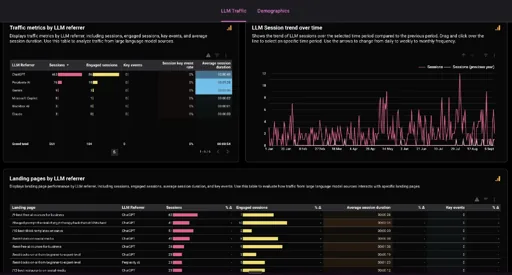
- Did anyone visit or buy? In GA4, open Reports → Acquisition → Traffic acquisition. Look for AI Assistant in the session default channel group. Add Session source to see individual referrers such as
chatgpt.com. Compare sessions and key events over the last 28 days with the previous 28. My free dashboard breaks this down by assistant and landing page. Google’s channel definitions · Get the AI referral traffic dashboard.
A customer might read the recommendation and phone the shop without clicking. Ask “How did you hear about us?” when you take a booking and keep that answer alongside your analytics. Re-run the same questions next month and date the changes you made. Open any new citation and see which fact it supports.
Can you claim a ChatGPT business profile?
As of 10 November 2026, the “Claim your business in ChatGPT” feature I mentioned in my video is a reported test. On 6 November, Marketplace Pulse founder Juozas Kaziukėnas shared a screenshot. Digiday subsequently reported that the unreleased Business Hub would let verified businesses see daily mentions and clicks, maintain product and company details, and supply information for a business agent. OpenAI hasn’t announced a public launch date. See the original screenshot · Read Digiday’s reporting.
For now, use the public merchant route above if you sell products. If you run a service business, start with the service page and the sources a real buyer’s question turns up.
Common questions about ChatGPT SEO
Can I pay ChatGPT to recommend my business?
You can buy labelled advertising in ChatGPT. Paying for an ad buys that placement. Organic answers are generated independently. Track paid campaigns separately when you review how customers found you. How ChatGPT’s organic and sponsored placements work.
How long does it take to appear in ChatGPT?
OpenAI says its systems can take about 24 hours to adjust after a robots.txt change. That’s the time to pick up the permission change. There’s no published timetable for a page to get cited or a business to be recommended. After changing access, check for a successful crawler visit. After changing a price or address, check the page and the next answer that cites it. OpenAI’s timing guidance.
Do I need llms.txt or special AI schema?
Start with the pages you already publish. Google explicitly says its AI search features need no special AI text file or schema. A useful FAQ is one where a customer finds the answer they came for. If you’ve got an hour, spend it answering the question your sales team heard three times this week. Google’s guide to optimising for AI search.
How does AI search optimisation differ from SEO?
You’ll hear the terms generative engine optimisation (GEO) and answer engine optimisation (AEO) for work on visibility in generated answers. Much of it is familiar SEO. The extra test is whether an assistant can assemble an accurate answer from several sources and explain why your business fits the buyer’s needs. A page can rank well for your name while your business is missing from the shortlist for a job you do every day.
Try that last test today. Pick the enquiry you’d most like to receive tomorrow, run it in a fresh chat and open the first source it cites. That’s usually enough to find a useful next edit. If you’d like to work through it with other marketers, join my free AI for Marketing community.